MQTTX Desktop
An elegant cross-platform MQTT 5.0 desktop client.
AIBuilt-in MQTTX Agent that operates the app for you.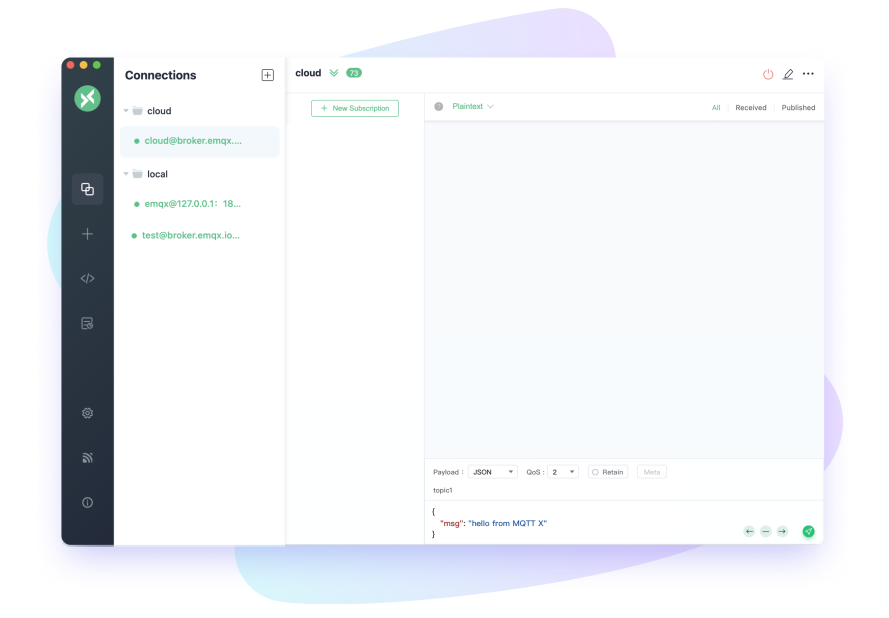
MQTTX is an MQTT 5.0 client toolbox for desktop, CLI and WebSocket.
An elegant cross-platform MQTT 5.0 desktop client.
AIBuilt-in MQTTX Agent that operates the app for you.A powerful and easy-to-use MQTT 5.0 command line tool.
AIShips with an Agent Skill that most AI coding agents can use.Learn MoreMQTTX makes developing and testing MQTT applications faster and easier.

Offers three convenient versions - Desktop, CLI, and Web - designed to adapt to your preferred work environment, with cross-platform compatibility (macOS, Linux, Windows).
Download
Alongside basic MQTT operations, MQTTX supports Scripts, Benchmarks, IoT Data Simulation, and the AI-powered MQTTX Agent.
Learn More
MQTTX is 100% compliant with MQTT 5.0, 3.1.1, and 3.1. We consistently keep up with the latest MQTT standards, ensuring testing features fully meet and comply with the protocol's requirements.
Explore MQTT 5.0'/%3e%3c!--%20Speech%20bubble:%20the%20assistant%20--%3e%3cpath%20d='M60%2058h46a10%2010%200%200%201%2010%2010v30a10%2010%200%200%201-10%2010H78l-14%2011v-11h-4a10%2010%200%200%201-10-10V68a10%2010%200%200%201%2010-10Z'%20fill='url(%23bubble)'%20fill-opacity='.6'/%3e%3c!--%20Sparkles:%20AI%20--%3e%3cpath%20d='M104%2070c2.4%2011.6%206.4%2015.6%2018%2018-11.6%202.4-15.6%206.4-18%2018-2.4-11.6-6.4-15.6-18-18%2011.6-2.4%2015.6-6.4%2018-18Z'%20fill='url(%23spark)'/%3e%3cpath%20d='M124%2058c1%204.6%202.6%206.2%207.2%207.2-4.6%201-6.2%202.6-7.2%207.2-1-4.6-2.6-6.2-7.2-7.2%204.6-1%206.2-2.6%207.2-7.2Z'%20fill='url(%23spark)'%20fill-opacity='.85'/%3e%3c/svg%3e)
MQTTX CLI ships with an Agent Skill that most AI coding agents can use, and MQTTX Desktop has MQTTX Agent built in, which operates the app from plain-language requests.
Deploy EMQX in the cloud or on your own infrastructure.
'/%3e%3c!--%20Cloud:%20the%20managed%20service%20--%3e%3cpath%20d='M58%20104h62a20%2020%200%200%200%201.5-39.9A29%2029%200%200%200%2065%2069.5a17.3%2017.3%200%200%200-7%2034.5Z'%20fill='url(%23cloud)'%20fill-opacity='.75'/%3e%3c!--%20Devices%20hanging%20off%20the%20cloud%20--%3e%3cpath%20d='M74%20104%2062%20126M89%20104v24M104%20104l12%2022'%20stroke='url(%23link)'%20stroke-width='3'%20stroke-linecap='round'/%3e%3ccircle%20cx='60'%20cy='130'%20r='6'%20fill='url(%23link)'/%3e%3ccircle%20cx='89'%20cy='133'%20r='6'%20fill='url(%23link)'/%3e%3ccircle%20cx='118'%20cy='130'%20r='6'%20fill='url(%23link)'/%3e%3c/svg%3e)
Build MQTT data pipelines in minutes and connect millions of devices as you scale.
'/%3e%3c!--%20Two%20server%20units:%20your%20own%20infrastructure%20--%3e%3crect%20x='50'%20y='52'%20width='76'%20height='28'%20rx='8'%20fill='url(%23rack)'%20fill-opacity='.75'/%3e%3crect%20x='50'%20y='88'%20width='76'%20height='28'%20rx='8'%20fill='url(%23rack)'%20fill-opacity='.75'/%3e%3ccircle%20cx='65'%20cy='66'%20r='4.5'%20fill='url(%23accent)'/%3e%3ccircle%20cx='65'%20cy='102'%20r='4.5'%20fill='url(%23accent)'/%3e%3cpath%20d='M84%2066h28M84%20102h28'%20stroke='url(%23accent)'%20stroke-width='3'%20stroke-linecap='round'%20stroke-opacity='.55'/%3e%3c!--%20Stand%20--%3e%3cpath%20d='M88%20116v12M70%20130h36'%20stroke='url(%23accent)'%20stroke-width='3'%20stroke-linecap='round'/%3e%3c/svg%3e)
Deploy EMQX on your own servers with full control.
MQTTX is open source. Star it on GitHub, chat with us on Discord, and follow EMQ on X for updates.







Use MQTTX on desktop, in your terminal or in the browser.
curl -fsSL https://emqx.sh/mqttx | sh