MQTTX 1.13.3: Security Improvements and CLI Updates
MQTTX 1.13.3 focuses on security improvements, a new CLI update command, and benchmark bug fixes and optimizations. It also expands Desktop Last-Will payload formats and improves everyday Agent interactions.
Security improvements
This release strengthens Desktop and Agent security across operation approvals, script execution, content handling, and update downloads.
- Tighten approval requirements for delete, clear, and script changes.
- Improve script execution and reply rendering, and use more secure storage for API keys.
- Verify CLI downloads and strengthen security in the Desktop update window.
Update MQTTX CLI from the terminal
Updating a standalone CLI installation previously meant downloading and replacing the executable. Starting with 1.13.3, you can run:
mqttx update
The command checks for a newer release and updates through the appropriate channel. Standalone binaries download and replace the current executable; npm and Homebrew installations invoke their package manager. Run mqttx --version afterward to check the installed version.
The update command is available from 1.13.3. Users on older versions need to upgrade once through their existing installation channel.
More accurate benchmarks and connection recovery
CLI publish and subscribe benchmarks now calculate rates using the actual sampling interval. Workloads start correctly when an initial connection succeeds after a retry, and active connection counts update correctly. This release also fixes split-file replay stalling after a disconnect.
Fixed %c in publish topic templates to use each connection’s actual ClientId.
Topics containing
%cmay change after upgrading; check subscriptions that depend on the previous topics.
Choose a Last-Will payload format
Contributed by Killian0812.
A Last-Will message lets the broker publish a predefined message when a client disconnects unexpectedly. If a device expects a binary format, its Last-Will payload needs the same encoding.
Desktop now supports Plaintext, JSON, Base64, Hex, CBOR, and MsgPack for Last-Will payloads. Open Last Will and Testament in the connection settings, enter the topic, QoS, retain setting, and payload, then choose a format from the bottom-right corner of the editor.
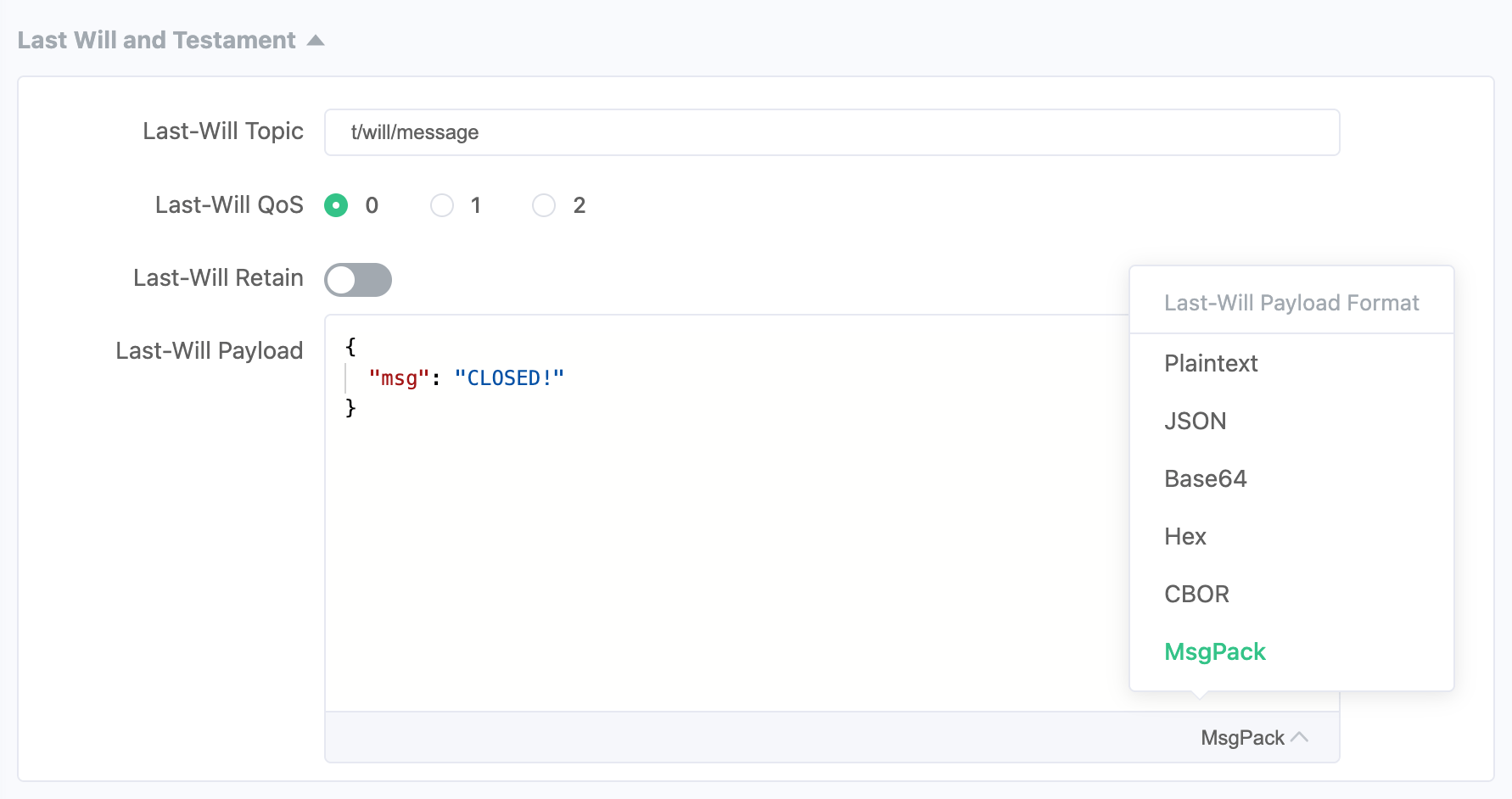
The Last-Will editor offers six payload formats.
For example, select MsgPack and enter a JSON object:
{
  "msg": "CLOSED!"
}
MQTTX encodes the Last-Will message as MsgPack, so you do not need a separate tool to prepare the binary content. The format is saved with the connection. Existing connections continue to use Plaintext by default.
Agent improvements for everyday work
Agent approval cards show more complete operation parameters, including timed-publish intervals, so you can check them before execution.
This release also improves reply rendering, MCP tool-name handling, and Desktop startup compatibility. Other fixes correct Last-Will topics in connection history and Hex payload encoding when input includes tabs or line breaks.
Download and share feedback
Visit the MQTTX download page to choose Desktop, CLI, or Web. See the v1.13.3 release for the complete changes, and report issues on GitHub.
Thank you to everyone who shared feedback, tested changes, and contributed to this release. Special thanks to Killian0812 for contributing Last-Will payload format support.